


- Joined
- Jul 14, 2013
- Messages
- 436
- Points
- 88

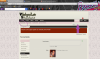
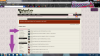
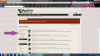
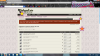
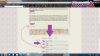
So GoldHazel is really lost on the new site and I told her i would help her out. So i figured i would do some pics to0 and help everyone out! this is just some of the basic stuff that i've figured out so far! Hope it helps everyone lost!
so i have 2 purple arrows that i think are the most important to me when i log in! the first one is New Posts! to find it first click on forums and you will see the new posts button. the 2nd arrow is alerts!you actually dont have to click on it, if you just hover your mouse over it you will see who quoted you, or liked something you posted.

ok so next pic is if i click on my "name" where the purple arrow is it brings me to an awesome page! This is where you can update your info, by clicking on personal details which i circled in purple.. and i just saw that i need to update my gender!


OK so while still in my account on the next line down - i clicked on Your Alerts (i also have a star maked at the top right that will show the same info!) -where the purple arrow is, you can see quotes and likes you have received. also if you go down with the arrow it has many options to get to conversations (also up with the star!) and to change info.

not sure if this is new or not but i didnt see this on the old site; its your news feed. this is where we get to stalk our fellow larians, well the ones we are friends with!!
kinda cool that i can go there and see what my fellow friends are liking and posting on!
next is the forums. i have a star by the button on the top left. i underlined the different ones. i really like the option on watched threads and forums. To watch a forum i have a star by it on the right, click on this link and it will ask you if you want to just follow it or get e-mail notification. it will ask you this when you follow a tread as well. (i dont have a pic for this but when you are on a thread its located in the same area as the watch forum link!) I also have a star on the right by the post new thread! this one took me a while to find!! :facepalm:

last but not least is creating a new thread! its soo easy , i actually think this is easier than before! especially adding photos!!! so i have a big purple arrow pointing down to where you click to upload a photo from your computer. then it gets listed in the attached files:. well i think this is the best part, when you "left click" and hold it, you can drag the photo and insert it into you message!
:joyful: oh if for some reason you accidentally close the window, the site saves what you typed! i did this several times while trying to type this up. all i had to do was go back into the forum i was posting to and clicked on new thread and my thread was saved! its amazing!!
Last edited by a moderator: