Welcome to Sphynxlair! Connect with Sphynx owners & enthusiasts around the world!

Sphynx bucks & The Lair Shop

admin

Administrator
Staff member
Joined
Jan 13, 2009
Messages
23,722
Points
643

Means I managed to get the same problem Goldhazel, so admin should be able to see it too if he uses that internet browser. :)
@zoinks - Are the images anywhere else like the shop area showing up distorted like this or just in the members postbit as described above.

Thanks,
 

GoldHazel

Gold Lairian
Notable Member
Joined
Feb 11, 2013
Messages
12,083
Points
653
@zoinks - Are the images anywhere else like the shop area showing up distorted like this or just in the members postbit as described above.

Thanks,

For me, Admin, it's just in the members' postbit, not in the shop area.
I can't see my items and I can't see anyone else's items once purchased.
 

zoinks

V.I.P Lairian
V.I.P Lairian
Joined
Mar 23, 2013
Messages
1,741
Points
368
ok I cant figure out how to do this I want some kitties :confused:

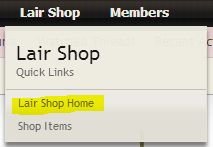
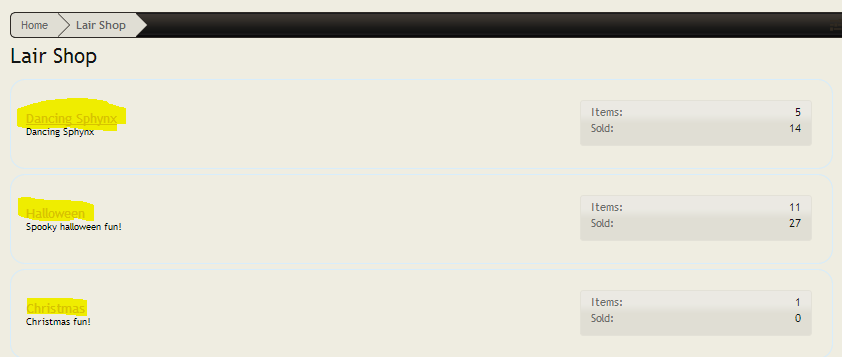
First choose 'Lair Shop' from the black bar menu at the top of the screen, the one with 'Home' and 'Forums' on it:

SL8IPcJ.png


- Select 'Lair Shop Home'

Here you can see the different categories of items, you can click any one to see the stock but I have used dancing sphynx:
AzIBzlb.png


- Select the category you want.

You will see the items in stock, and their prices:

ide8cL8.png


- Select 'Buy Item' to buy an item.

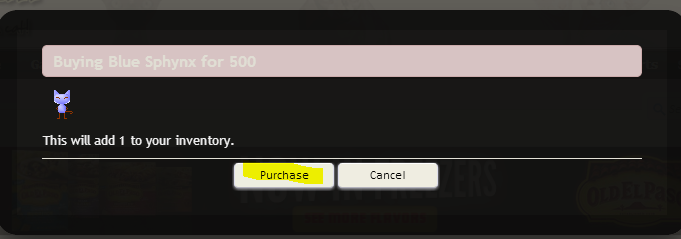
You will get a confirmation popup:

mUpGFAP.png


- Select 'Purchase'

You will then be shown back to your 'Shop Home' where you can see the items you own:

HmIsT3f.png


Make sure to select 'Yes' in Postbit Display or it will not show up on your posts. You can also change the display order to set what order the items appear.

If you want to get back to this page, follow step 1 and select 'Shop Items' from the Lair Shop options.

These are from the web, if you are on a phone the screens might be slightly different.

Hope this helps!! :)
 

zoinks

V.I.P Lairian
V.I.P Lairian
Joined
Mar 23, 2013
Messages
1,741
Points
368
@zoinks - Are the images anywhere else like the shop area showing up distorted like this or just in the members postbit as described above.

Thanks,

On Internet Explorer 9 they are also like that in the shop for me.

kosSCXf.png


I only use IE9 in work for testing so it's not a big deal to me at least. Looked like the img width on the img tags are 1px for some reason. Tried clearing my cache just in case and still happens.
 

admin

Administrator
Staff member
Joined
Jan 13, 2009
Messages
23,722
Points
643

On Internet Explorer 9 they are also like that in the shop for me.

kosSCXf.png


I only use IE9 in work for testing so it's not a big deal to me at least. Looked like the img width on the img tags are 1px for some reason. Tried clearing my cache just in case and still happens.
Yeah - I see that, I have reported it to the creator of the add on. I do have adjustments to the width px, but it starts making the images look distorted. IE is horrible with many things unfortunately. For those of you having issues, use another browser, their free.
 

Ickushouse

V.I.P Lairian
V.I.P Lairian
Joined
Jul 27, 2013
Messages
2,204
Points
233
I bought 2 hamsters just to see what would happen. ;) It doesn't look like one can go back in and gift a duplicate once you have completed the purchase, so if you're gifting a duplicate item, be sure to do it upon purchase! Admin, please let me know if I'm missing something! I would love to be wrong about this. Thanks!
 

admin

Administrator
Staff member
Joined
Jan 13, 2009
Messages
23,722
Points
643
I bought 2 hamsters just to see what would happen. ;) It doesn't look like one can go back in and gift a duplicate once you have completed the purchase, so if you're gifting a duplicate item, be sure to do it upon purchase! Admin, please let me know if I'm missing something! I would love to be wrong about this. Thanks!
If you bought more than one of the same item, you can send it as a gift at anytime.
 

admin

Administrator
Staff member
Joined
Jan 13, 2009
Messages
23,722
Points
643
I see skinny lines in the shop I haven't bought anything because I can't see it... :(
The author of the add on just out of surgery, I made him aware of the issue, it's an Internet Explorer issue as far as I can tell. The free browser Chrome or firefox should work just fine for now.
 
Last edited:

GoldHazel

Gold Lairian
Notable Member
Joined
Feb 11, 2013
Messages
12,083
Points
653
Can someone confirm who was having the browser issues or seeing the little lines whether or not the can now see the images here correctly?
http://www.sphynxlair.com/community/ishop/items/1/

As soon as the Lair Shop opened, I purchased my items and while in the Shop, I was certainly able to see what I wanted to get. But once I purchased them, it shows up as skinny lines on my name and everyone else's.

Now when I go back to the Lair Shop, I CANNOT see any items to purchase as everything IS a skinny line. :(
 

admin

Administrator
Staff member
Joined
Jan 13, 2009
Messages
23,722
Points
643

FYI I can reproduce on IE9, see pic below:

VbPeETe.png

@zoinks - can you please verify whether or not IE9 still displays it as you have it shown above? Is anyone else having issues seeing the images and what browser are you using - i.e. -Internet Explorer and version, 9, 11 etc.

Thanks,
 

zoinks

V.I.P Lairian
V.I.P Lairian
Joined
Mar 23, 2013
Messages
1,741
Points
368
@zoinks - can you please verify whether or not IE9 still displays it as you have it shown above? Is anyone else having issues seeing the images and what browser are you using - i.e. -Internet Explorer and version, 9, 11 etc.

Thanks,

All looks good now on IE9 :)
 
Back
Top